
Automatic clock-in by location
You arrive at work.TimeCashdoes the rest.
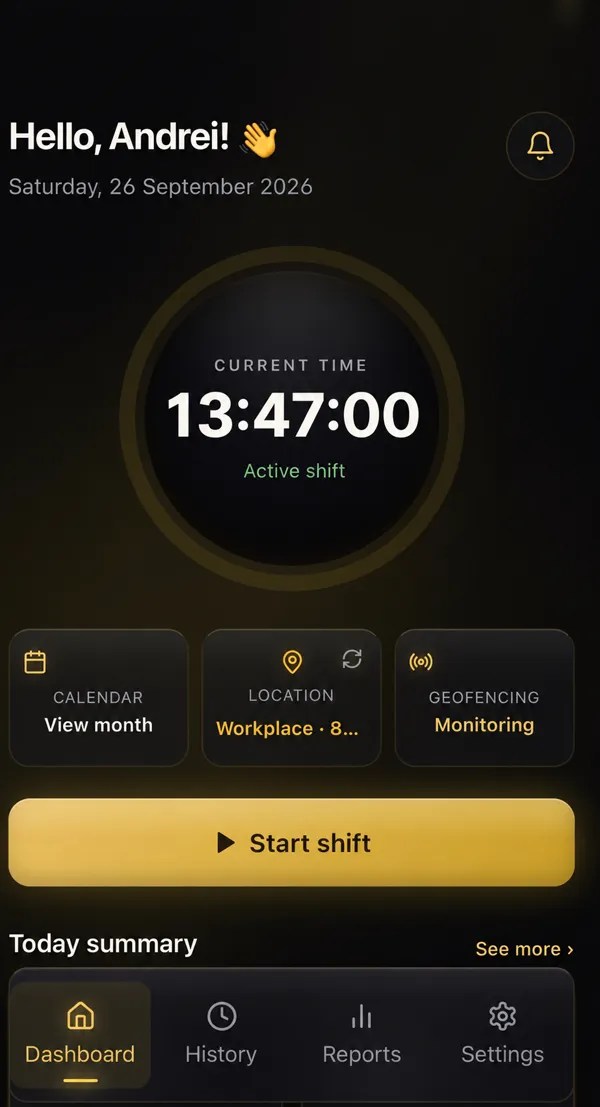
Track your hours automatically and see how much you have earned, without the hassle.
Saturday, September 26, 2026

1. You arrive at work
The app detects your location as you enter the zone.
2. Automatic clock-in
Your hours are recorded without you having to do anything.
3. Your hours and pay, calculated
See how long you have worked and how much you have earned.
Your location stays private
In automatic mode, it is used only on your phone for clock-in. Your company does not receive it.
Automatic GPS
The app clocks you in and out using geolocation.
Timer and manual
You can also clock in with a timer or enter your hours manually.
PDF and CSV reports
View and download your hours and earnings whenever you need them.
How it works
 1
1Arriving at work
You walk into the work zone with your phone in your pocket.
 2
2Automatic detection
The app detects your location and checks the zone.
 3
3Shift starts by itself
No buttons, nothing to forget.
07:00
TimeCash now
Shift started! Have a good one!
4Notification
You get told your shift has started.
 5
5Control for the company
With TimeCash Business (in pilot), the company sees in real time who is working.
Choose how to clock in
Automatic
Your phone starts and stops the shift by itself, when you enter or leave the workplace area.
- Up to 5 workplaces
- Adjustable radius and active hours
- Notifications on arrival and departure
Timer
You tap Start when you arrive and Stop when you leave.
- Time rounding
- Fix the start time if you forgot to press Start
- Optional location when saving
Manual
You type in your hours yourself, at the end of the day.
- Hourly rate, break and note
- Edit any time from the Calendar
- No rounding: exact times are saved
For companies: terminal, NFC card and kiosk
With TimeCash Business, your team can also clock in at a terminal with an NFC card or keyring, with an NFC tag at the entrance or at a PIN kiosk.
See TimeCash Business
Your hours. Your money. Clear.
Without TimeCash
- You jot your hours on paper or in your phone notes.
- You forget to write down a day.
- At the end of the month you don't know what you're owed.
- You have nothing to show when the hours don't add up.
With TimeCash
- Hours are logged on their own or with one tap.
- You see what you've earned, every day.
- A calendar with the whole month.
- A PDF or CSV report, ready to show.
Everything TimeCash does.
Time rounding
None, 15 minutes, 30 minutes or 1 hour, with separate rules for clock-in and clock-out. Not applied to manual entries.
Breaks
Subtracted from the total, so only paid time is left.
Hourly rate
Hours worked minus breaks × your rate = what you earn.
Working days
Set your work days for reminders and calendar marks.
Calendar
Days with entries, days off, and work days with no hours. Tap a day to fix it.
PDF and CSV reports
Ready for your accountant or your boss.
Connect to your company
With your company's code. They see your hours, not your position on the map. If an entry changes, you get a message and can dispute it with a reason.
Backup to your account
Optional, to restore your data on another phone.
Works without an account
Download it and start. No sign-up.
Who is TimeCash for?
Warehouses and logistics
Long shifts in warehouses and distribution centres.
Farm work and harvest seasons
Days that change with the season.
Construction
Different sites, hours that count.
Cleaning and maintenance
Several workplaces in a single day.
Hospitality
Split shifts and changing schedules.
Freelancers and hourly workers
Every hour counts, and you want to see it.
TimeCash in numbers.
3
ways to clock in
5
workplaces, at most
8
languages
2
export formats (PDF and CSV)
Why track your hours?
In Spain, daily working-time records have been mandatory for companies since 2019.
Keeping your own record helps you check that the hours you're paid match the hours you worked.
This is general information, not legal advice. In other countries, check your local rules.
Active employees
24
Hours worked today
168,5
Active breaks
3
Real-time activity
| Employee | Status | Clock-in | Building |
|---|---|---|---|
| Andrei P. | Working | 07:00 | Nave 3 |
| Lucía G. | Working | 07:12 | Nave 1 |
| Marek K. | Break | 06:45 | Nave 3 |
| Ana R. | Working | 08:02 | Nave 2 |
For companies
In pilot.
Your whole team's time records in one panel.
- Real-time panel
- Locations and zones
- Automatic reports
- PDF and CSV export (time records)
Your location stays yours
The company never sees your real-time position or your route. Automatic-mode records do not send coordinates (since version 2.7.3). The company never sees the real-time position or the route; automatic records send no coordinates, and timer and manual records only include the point where they were saved if the worker turns on «Attach location to record».
TIMECASH BUSINESS · PILOT
TimeCash Business.
A web platform for the company, the app for every worker, terminals and NFC cards. Official launch: March 1, 2027.

Petruț Dugutin
Founder · TimeCash
I didn't build TimeCash to sell an app. I built it because I needed it.
I work in Spain, in shifts, like many of you. And for years my hours never added up.
I forgot to write them down. I noted them wherever I could. And at the end of the month I'd look at my payslip and wonder: "Have I been paid for everything I worked?" I had nothing clear to check it against.
So I made myself a simple Excel sheet. Just for me. It helped, but I still had to remember to fill it in. Then I built something a bit more complete. Then something more. Step by step, year after year, that spreadsheet became TimeCash.
Today the app does by itself what I used to forget: it records my hours when I arrive at work and shows me, every day, how much I've earned. I use it myself, every day, at work.
I decided to make it free for everyone because I know how much it matters. An hour worked should be an hour paid. And you should know it for sure, not from memory.
Pricing.
TimeCash for workers
Free
The app includes ads.
Available on the App Store and Google Play.
Frequently asked questions.
Is it free?
Yes. TimeCash is free for workers; the app includes ads.
Do I need to create an account?
No. The app works without an account. An account is optional and is used for backup.
How does the app know I've arrived at work?
In automatic mode you place your workplace on the map with the radius you choose. Your phone detects when you enter and leave that area.
What permissions does it need?
For automatic mode, location set to "Always". On Android, it's best to remove battery restrictions for TimeCash.
What if there's no GPS signal in the warehouse?
An event may be missed. Check your shift on those days or use the timer.
Can my company see where I am?
The company never sees your real-time position or your route. Automatic-mode records do not send coordinates (since version 2.7.3). In timer and manual mode, only if you turn on «Attach location to record», the record includes the point where it was saved.
Can I fix an entry?
Yes, from the Calendar.
Can I export my hours?
Yes, as PDF or CSV from Reports.
Which languages is it in?
8: Spanish, Romanian, English, French, Italian, German, Portuguese and Polish.
Does it work on iPhone and Android?
Yes. It's on the App Store and Google Play.